

How to Write SEO Titles & Meta Descriptions That Actually Get Clicks (With Real Examples)
oogle Search. This guide covers proven best practices, common mistakes, real-world examples, and practical tips to improve your click-through rate (CTR) and organic traffic.
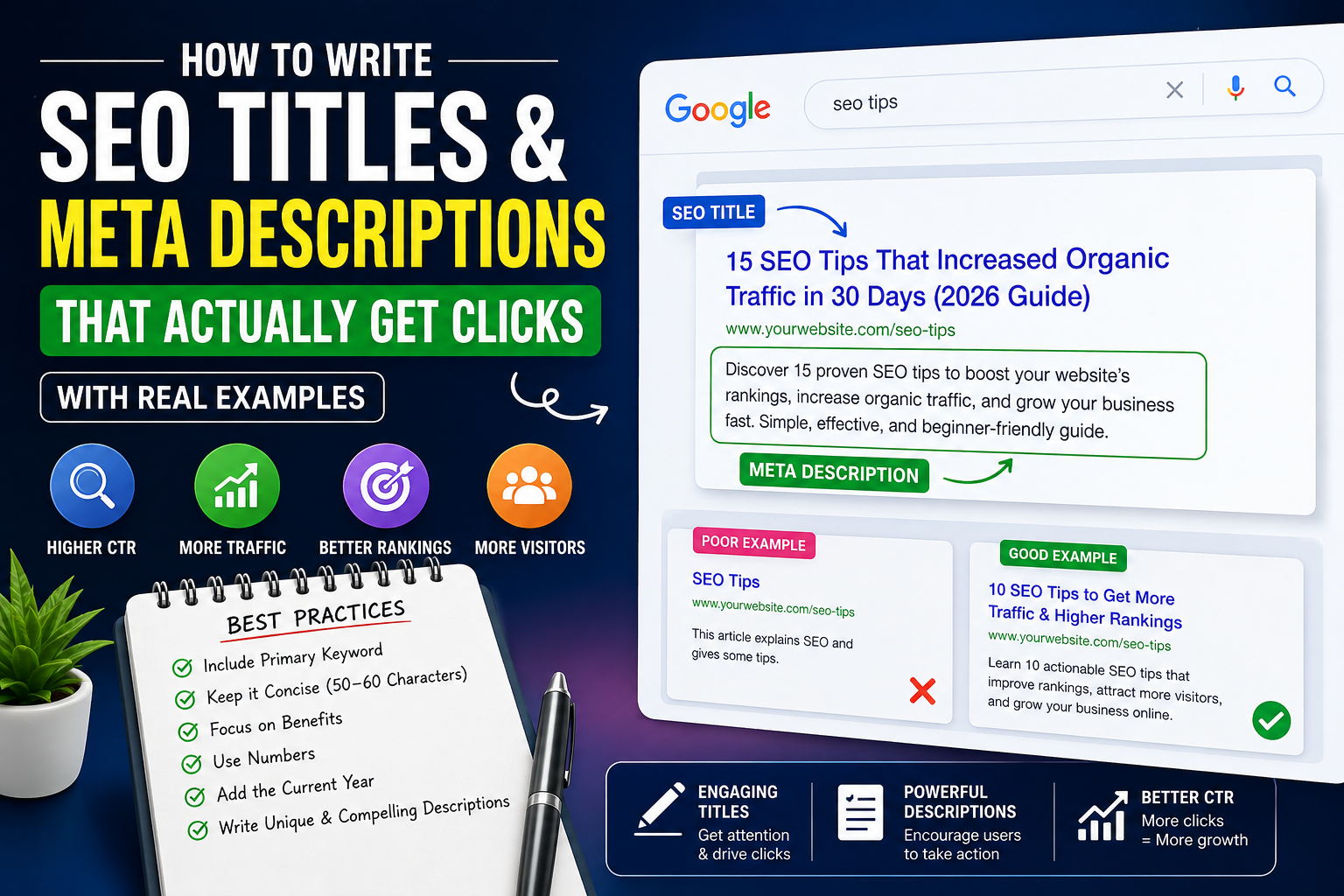
Ranking on Google's first page doesn't guarantee traffic. If your title tag and meta description fail to grab attention, users will simply click on a competing result.
Your title tag is the first thing people notice in search results, while your meta description gives them a reason to visit your page. Together, they have a huge impact on your organic click-through rate (CTR).
Before optimizing your metadata, it's a good idea to run a complete SEO Website Checker to identify technical SEO issues that may also affect your search performance.
In this guide, you'll learn how to write compelling SEO titles and meta descriptions, avoid common mistakes, and optimize every page for higher CTR with real examples.
What Is an SEO Title?
An SEO title, also known as a title tag, is the clickable headline displayed in Google Search results and browser tabs.
Example:
How to Write SEO Titles That Get More Clicks | Zetawala
A good title tells both Google and users exactly what your page is about. It should be relevant, descriptive, and compelling enough to encourage clicks. You can also inspect how your page outputs title tags using the Header & Meta Tags Inspector.
What Is a Meta Description?
A meta description is the short summary that appears below your title in search results.
Although Google doesn't use meta descriptions as a direct ranking factor, they heavily influence whether users click your page.
A persuasive meta description clearly explains the page's value and encourages action. You can quickly review the quality, length, and optimization of your metadata with the Title & Meta Description Analyzer before publishing.
Why Click-Through Rate (CTR) Matters
Imagine two pages ranking in the same position.
- Page A receives a 3% CTR.
- Page B receives a 12% CTR.
Which result do you think attracts more visitors?
Higher CTR means more organic traffic without improving your rankings. That's why optimizing titles and meta descriptions is one of the easiest ways to increase SEO performance. After publishing, you can measure the overall impact using the SEO Health Score Calculator.
How to Write SEO Titles That Get More Clicks
1. Place Your Primary Keyword Near the Beginning
Including your main keyword near the beginning of the title helps both search engines and users immediately understand your page's topic.
Good Example
SEO Title Generator: Create High-CTR Titles in Minutes
Poor Example
Everything You Should Know About Creating Better SEO-Friendly Website Headlines
2. Keep Titles Between 50–60 Characters
Long titles often get truncated in Google Search, reducing their effectiveness.
Before publishing, check your title length using the Title & Meta Description Analyzer to ensure it displays properly across devices.
3. Focus on Benefits, Not Features
Instead of simply describing your article, tell readers what they'll gain.
Examples:
- Increase Organic Traffic
- Improve Google Rankings
- Boost Click-Through Rate
- Get More Website Visitors
People click on value, not descriptions.
4. Use Numbers and Specific Data
Numbers naturally attract attention and improve readability.
Examples:
- 10 SEO Title Tips
- 25 Meta Description Examples
- 7 Common SEO Mistakes
5. Include the Current Year
Adding the current year helps communicate freshness for time-sensitive topics.
Examples:
- SEO Guide (2026)
- Best SEO Practices for 2026
6. Avoid Keyword Stuffing
Repeating the same keyword multiple times makes your title look spammy and can reduce user trust.
Instead of stuffing keywords, write naturally and verify keyword usage with the Keyword Density Checker.
How to Write Meta Descriptions That Increase CTR
Your meta description should summarize the page while giving users a strong reason to click.
An effective meta description should include:
- Your primary keyword
- A clear benefit
- Action-oriented language
- A compelling call-to-action
- Around 140–160 characters
After writing your description, validate it with the Title & Meta Description Analyzer to ensure the ideal length and optimization.
Common Mistakes to Avoid
Many websites lose valuable traffic because of simple metadata mistakes.
Common issues include:
- Duplicate title tags
- Duplicate meta descriptions
- Missing metadata
- Titles that are too long
- Keyword stuffing
- Generic page titles
- Misleading clickbait
- Repeated metadata across multiple pages
Running a regular SEO Content Audit helps identify these issues before they affect your rankings and CTR.
Why Google Sometimes Rewrites Your Titles
Google occasionally replaces your title tag with different text in search results.
This usually happens because:
- Your title is too long.
- The page contains duplicate metadata.
- The title doesn't accurately describe the page.
- The wording is too generic.
- The page has indexing or canonical issues.
If your titles are frequently rewritten, use the Canonical & Indexability Checker to rule out indexing and canonical problems.
Best Practices Checklist
Before publishing any page, make sure:
- Your primary keyword appears naturally.
- The title is compelling and concise.
- The meta description encourages clicks.
- Every page has unique metadata.
- There is no keyword stuffing.
- The content matches the title.
- Metadata follows SEO best practices.
You can verify all these elements using the Header & Meta Tags Inspector and Title & Meta Description Analyzer.
Analyze Your Metadata Before Publishing
Even experienced SEO professionals occasionally publish pages with missing or poorly optimized metadata.
Before making a page live, review your title length, description length, keyword placement, uniqueness, and overall readability.
For a complete on-page review, combine the Title & Meta Description Analyzer, SEO Content Audit, and Keyword Density Checker to catch issues before Google indexes your content.
Final Thoughts
Improving your SEO titles and meta descriptions is one of the fastest ways to increase organic traffic without creating new content.
Small changes to your metadata can lead to significantly higher click-through rates and better search visibility over time.
Before publishing any page, analyze your metadata with the Title & Meta Description Analyzer. For a complete optimization workflow, also run the SEO Website Checker, review your content with the SEO Content Audit, and measure your overall optimization using the SEO Health Score Calculator.
Discussion (0)
No comments yet. Start the conversation!